
BarePumps · service stations
Run the whole service station from one system.
Forecourt, shop, takeaway and workshop. Attendant cash-ups from the pump meters, tank dips and wet stock, fleet cards and accounts, and one profit and loss with staff, rent and utilities. It runs on your own PC at the station, so it keeps going when the internet drops.
Leave the serial empty in the installer and your 14-day trial starts. The PC needs the internet while it installs.
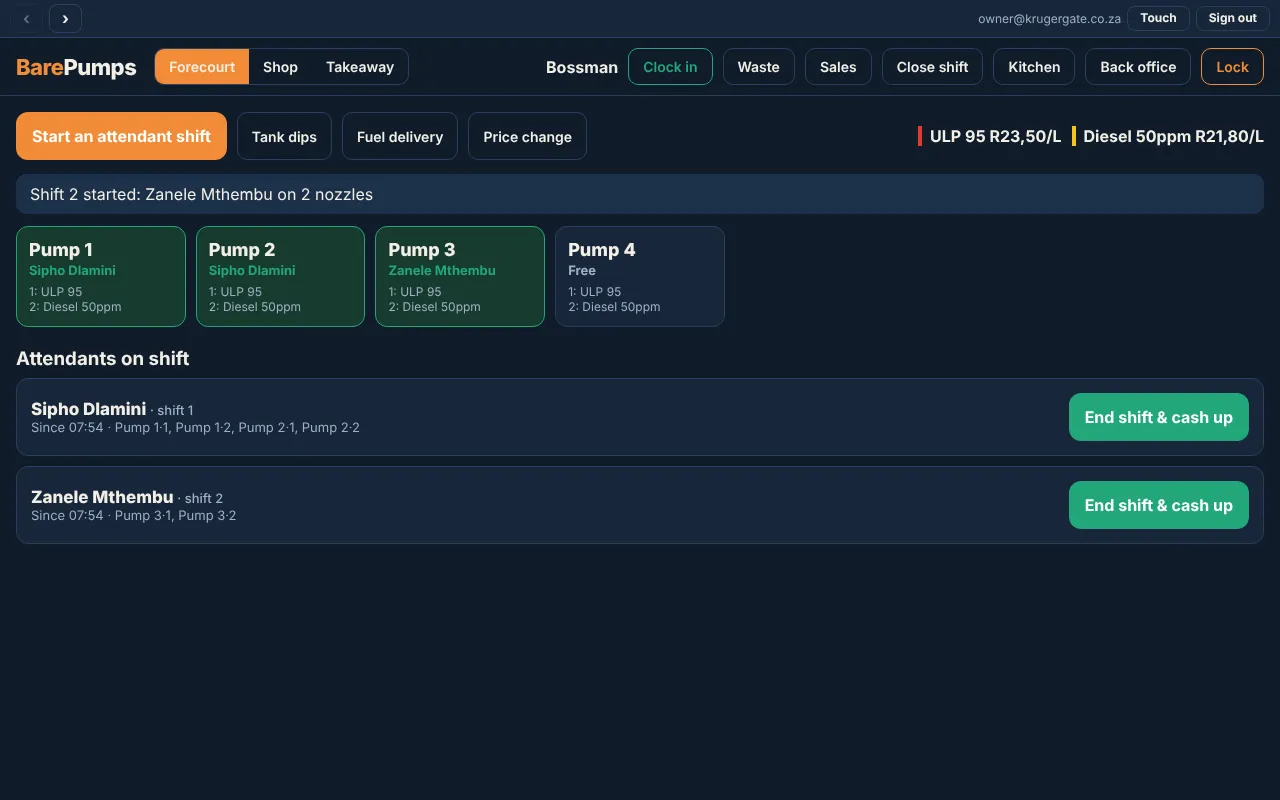
Attendant shifts, cashed up from the meters
Start a shift with the opening meter on each nozzle. At the end, type the closing meters and what the attendant hands in: bank card slips, fleet card slips, account slips and cash. BarePumps works out what was sold and shows short or over on the spot. A shortage goes to the profit and loss by itself.
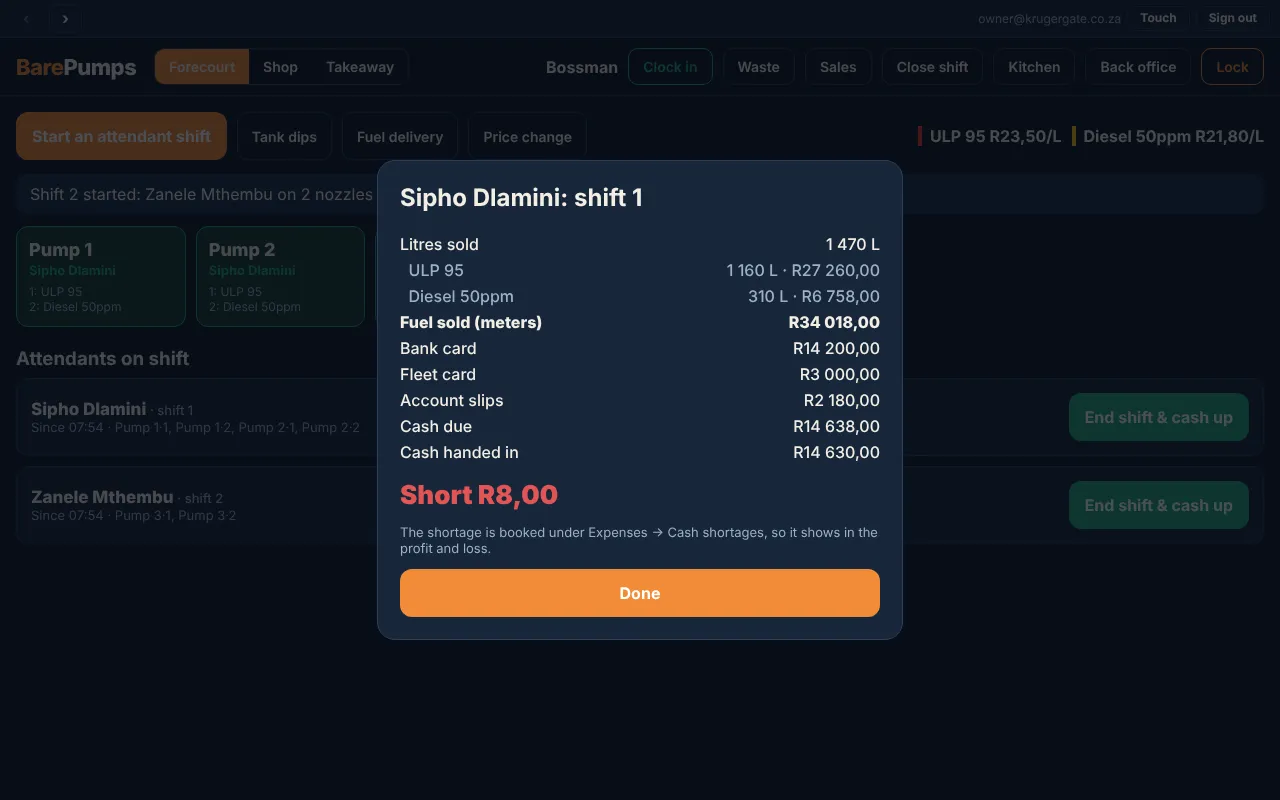
Wet stock: what the tanks should hold
Dip the tanks, book deliveries off the delivery note, and BarePumps does the sum: opening dip plus delivered minus sold on the meters, against the closing dip. Leaks, theft and meter problems show up in litres and per cent, per tank.
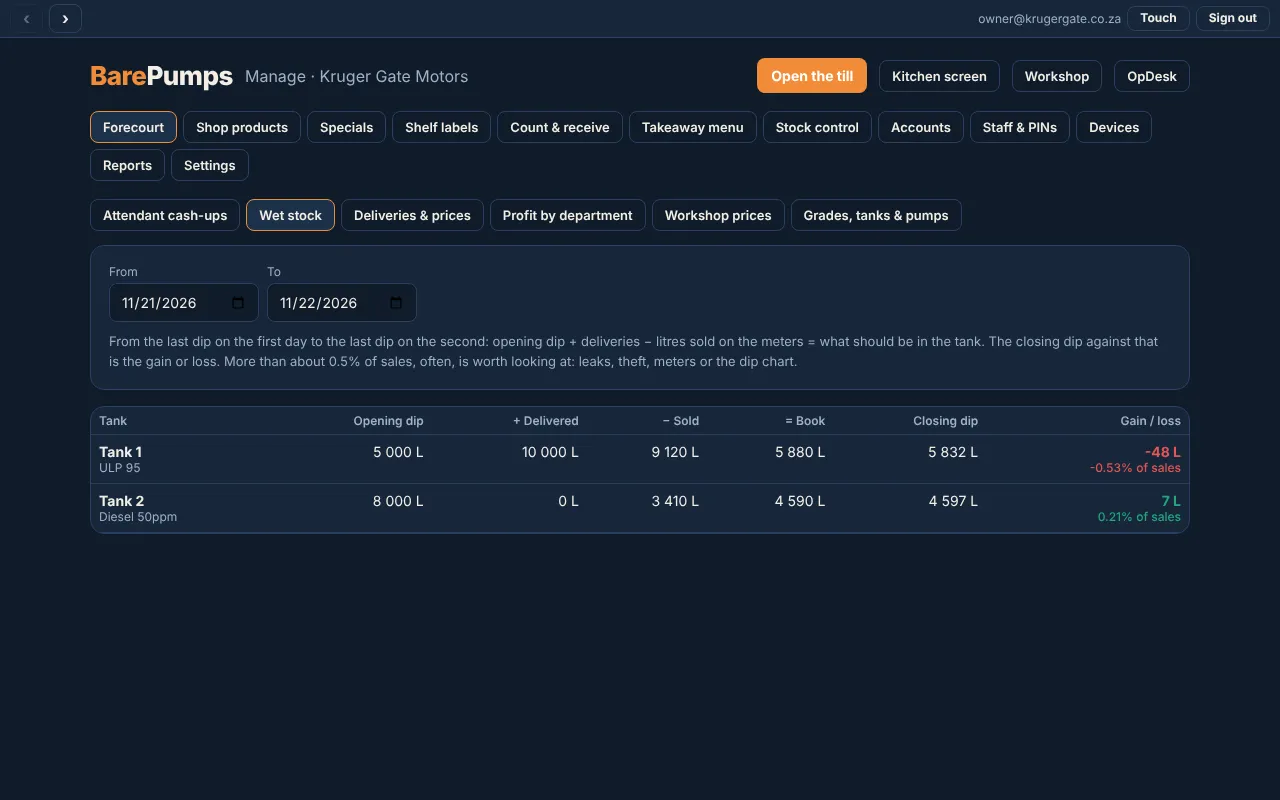
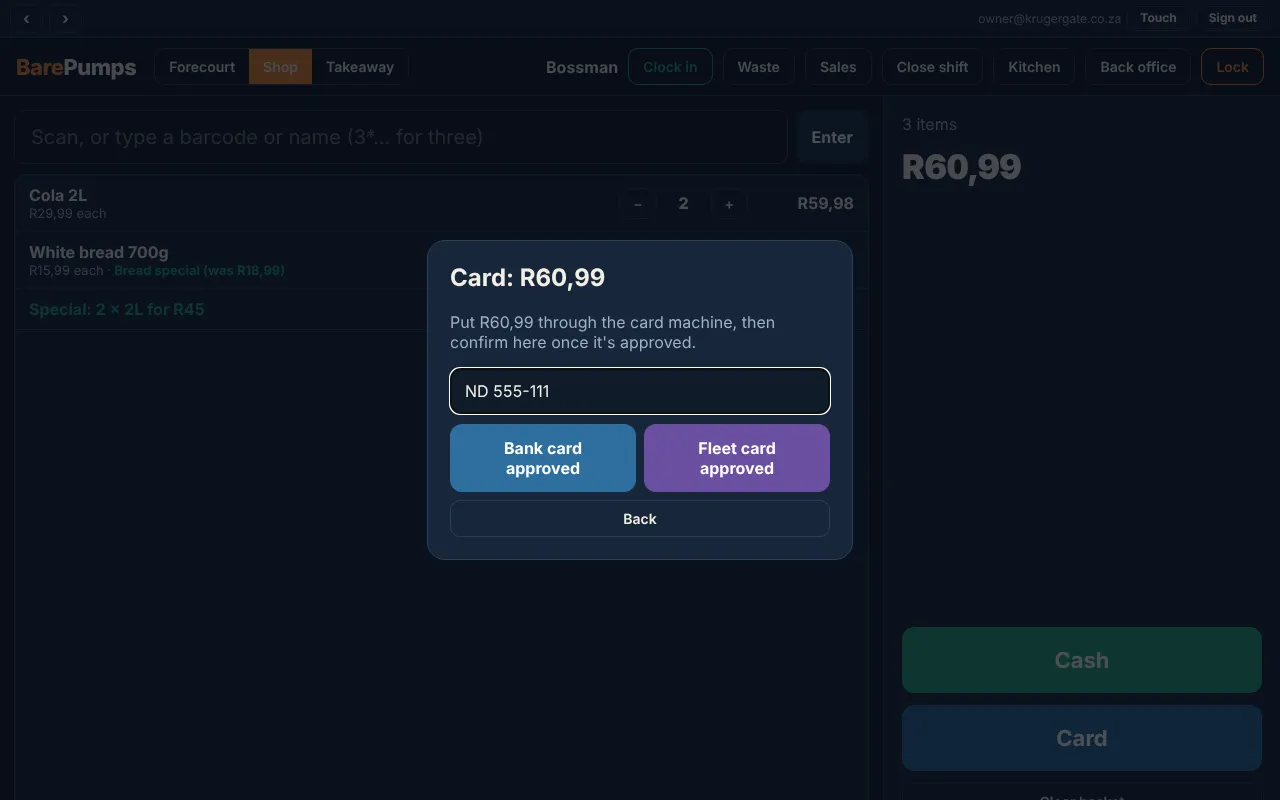
The shop till, with fleet cards
Scan and pay in the forecourt shop, with specials, shelf labels and stock counts. Fleet cards go through your card machine and are marked as fleet, so the fleet card payout is matched apart from the bank cards.
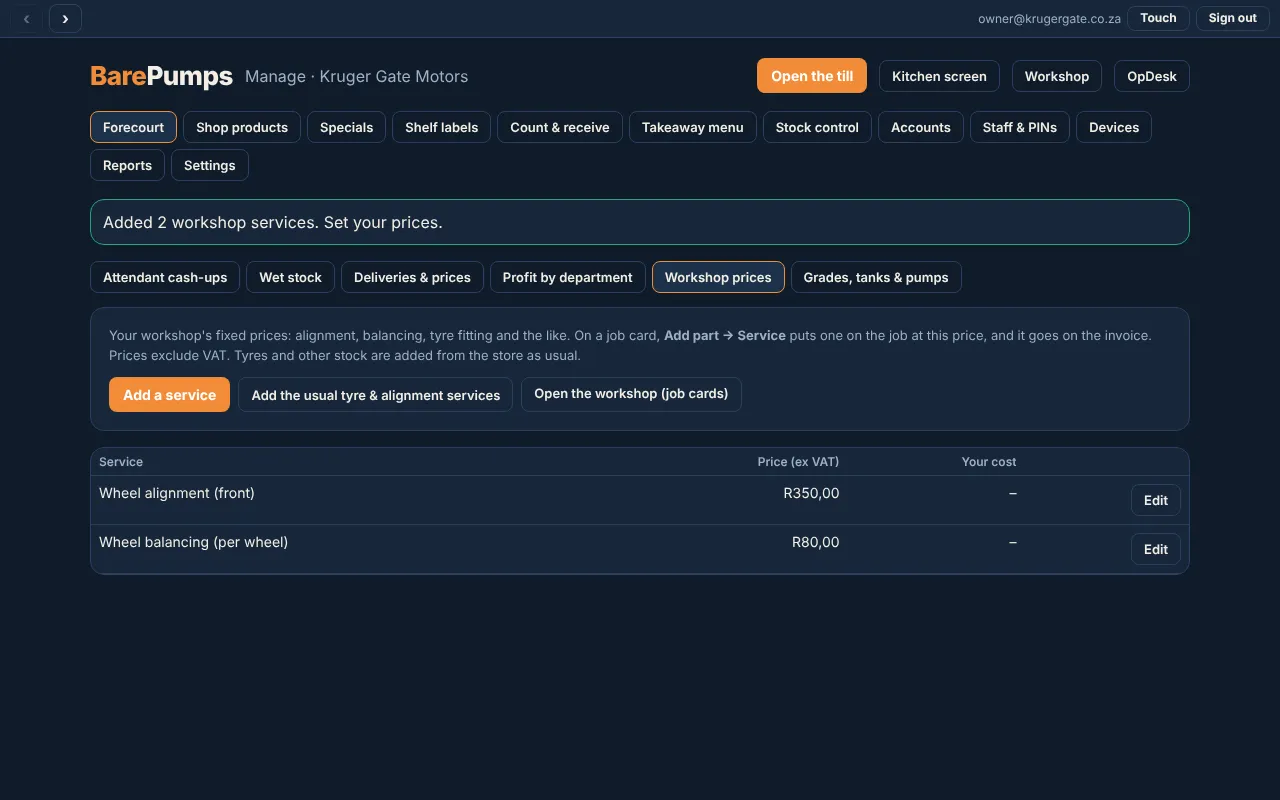
A workshop with your own price list
Job cards for tyres, balancing, alignment and services. Add a service from your price list, tyres and parts from stock, and invoice the job. The alignment machine's printout (PDF) is kept on the job card.
Profit by department
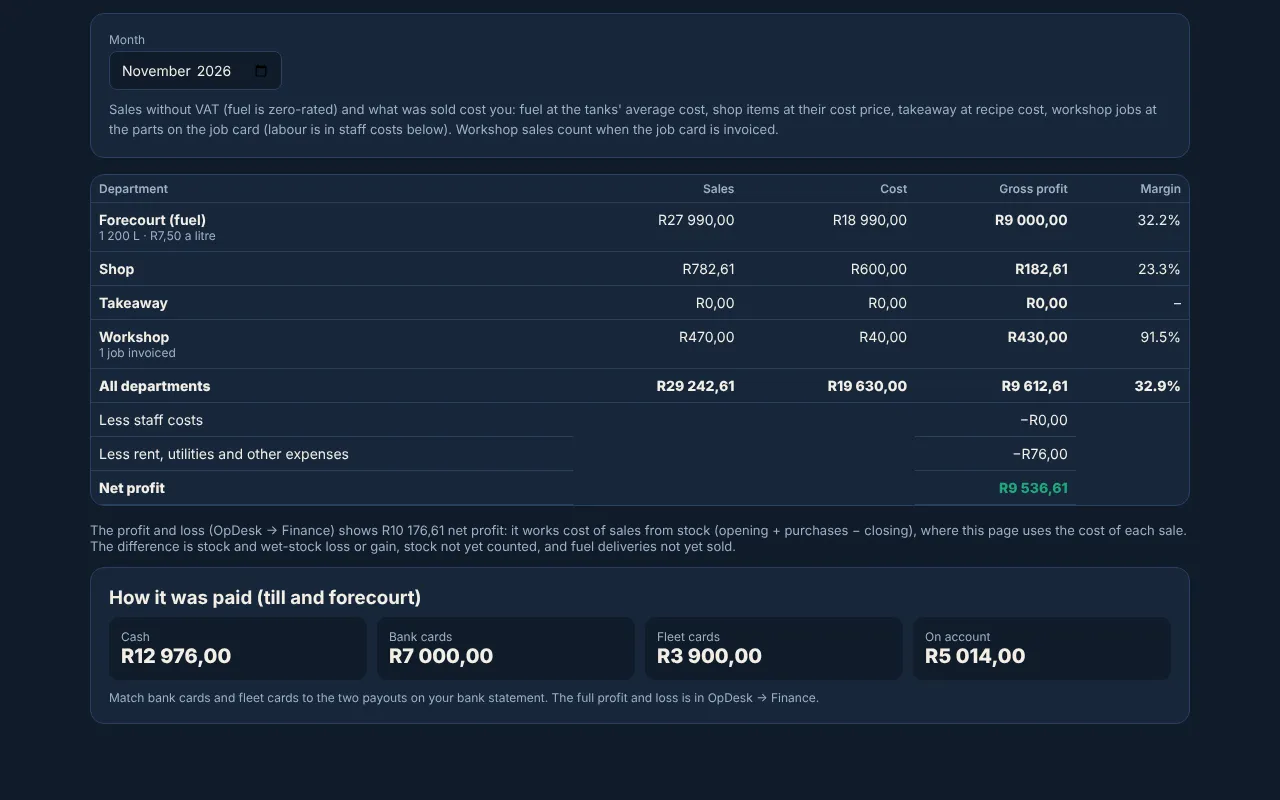
Forecourt, shop, takeaway and workshop, each with sales, cost and margin, and the fuel margin per litre. Then staff costs, rent and utilities, down to the net profit for the month.
Also in BarePumps
Price changes mid-shift: the meter is read and the litres split at the old and new price
Fuel is zero-rated: the VAT report keeps it out of output VAT
Customer accounts with credit limits and monthly statements
A takeaway counter with a kitchen screen
Staff PINs, a manager PIN for voids, clock-in and shifts
Staff costs, rent, utilities and supplier invoices in one profit and loss
Receipt printers and cash drawers
Daily backups on the PC
Price
BarePumps
R1 999 a month
plus R7 500 once-off setup
Forecourt, shop, takeaway and workshop, updates, daily backups on the PC, and WhatsApp/email support included.
Prices include VAT. Activate from inside BarePumps when your trial is up: you pay the setup and the first month by card through PayFast, then the monthly amount until you cancel.
When the internet goes down
Does it stop when the internet goes down?
No. The forecourt tablet, the shop till and the office talk to the BarePumps PC over the station's own network, so shifts, cash-ups, sales and stock carry on.
And when the power goes?
Put the BarePumps PC and the router on a small UPS. When the power is back everything is where you left it.
How long can it run without internet?
Up to 30 days. It checks its licence whenever it has internet. Longer than that? We send you an unlock code by WhatsApp. Your data is never deleted or locked away.
What about card machines?
Your bank's card machine works on its own SIM or line, as it does today. Attendants hand in their slips at cash-up, and the shop records card or fleet card once the machine approves it.
Try it in an afternoon
- Download the installer on the PC that will be the station's BarePumps PC (the office PC).
- Run it and leave the serial empty: you get a free 14-day trial.
- Add the business and the owner's login on the set-up page that opens.
- Set up your grades, tanks and pumps, take an opening dip, and add your attendants.
- Open the forecourt on a tablet and the till in the shop, and start the first shift.
What you need
- A Windows 10 or 11 PC (64-bit) with 16 GB RAM and an SSD, on a network cable to your router
- A tablet or PC for the forecourt, and a PC or touch screen for the shop till
- A USB or Bluetooth barcode scanner for the shop
- Optional: a receipt printer and cash drawer
A shop without pumps? BarePOS Market is for supermarkets and shops.
Questions
Does it read my pumps automatically?
Not yet. Today attendants or the cashier type the meter readings at the start and end of each shift, which is how most stations cash up anyway. A direct link to forecourt controllers is being built; ask us which controller you have.
How does it handle a price change?
Enter the new price and the meter readings on the nozzles that are on a shift. The litres before the change are charged at the old price and the rest at the new one.
Fleet cards or accounts: what's the difference?
Fleet cards (bank fleet cards) are paid by the card company, so they're handled like card payments, just kept apart. Accounts are your own customers who pay you monthly: their slips go on their account and on their statement.
Can the workshop use the alignment machine's report?
Yes. Save the report from the machine's own software as a PDF and add it to the job card. It stays with the job, and you can print or send it to the customer.
Is my data mine?
Yes. It lives on your own PC at the station, with a backup every day. Nothing is deleted if the subscription stops.
Can I cancel?
Yes, any time. It keeps working until the end of the month you paid for.